Fundamentals: What is zero-copy ingest?

Xarray Community Developer
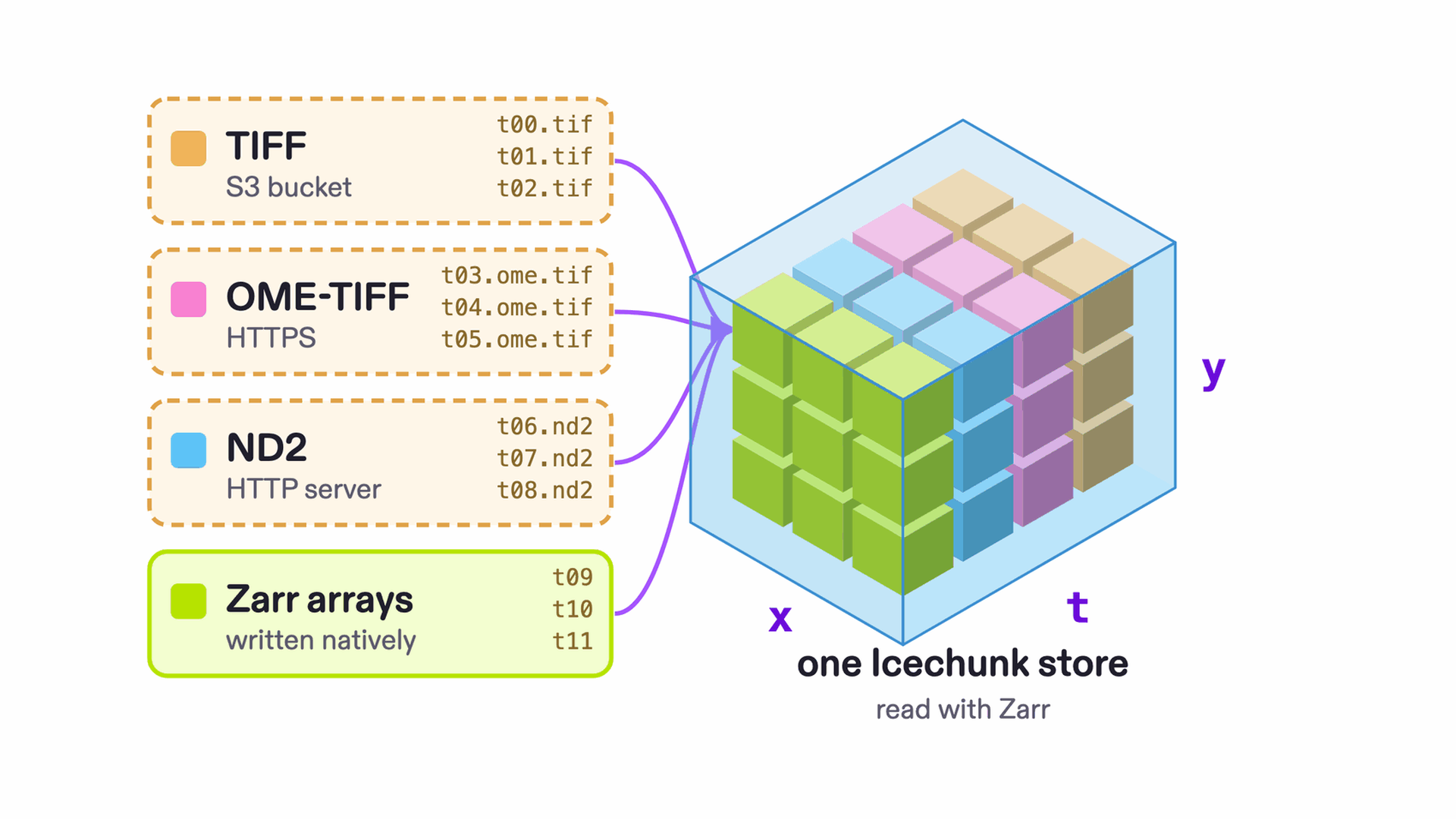
Zero-copy ingest, also called virtualization, takes any collection of files, in any mix of formats, and presents it as though it were Zarr, without copying any of the original data. It works by recording where each chunk of array data sits inside the original files, so a reader can fetch those bytes directly.
Once you have the virtualized dataset, you can persist it in Icechunk to reuse or share it. Icechunk lets you add native Zarr chunks alongside the virtual chunks, or even replacing them, and keeps a version history of all array changes.
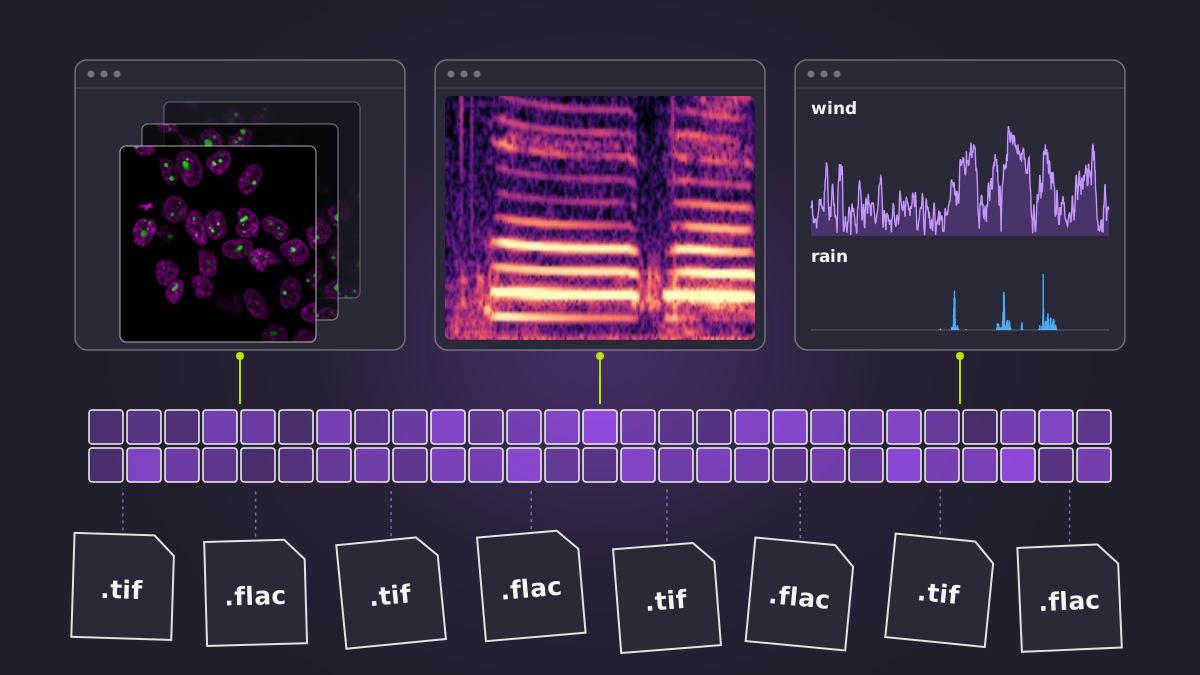
This is a solution to a very common problem. You have a folder full of TIFF or H5AD files that form part of one larger dataset. Or several folders of TIFF, ND2 and HDF5 files from different instruments measuring the same sample. These are all pieces of the same underlying data cube, and they should really be treated as a single coherent dataset.
Until recently you had only two options to handle this, both with drawbacks.
Assemble it in code. Parse the file names to find what each file holds, work out how the pieces in different files line up into one cube, and open TIFF, and ND2, and HDF5 along the way. Anyone else who wants to use the data needs your code, in whatever language they happen to work in. If they can’t find it or don’t know it exists, they have to reinvent it.
Convert to Zarr. Zarr can be read from almost any programming language, so the format problem goes away. But conversion is expensive and duplicates the data, and now you have two sources of truth, the raw files and the Zarr copy.
Zero-copy ingest to the rescue
With Icechunk’s support for virtual chunks you have a third, better, option.
Icechunk is an open-source array format and library for scientific data. Anyone reading an Icechunk repository sees ordinary Zarr, so any tool that reads Zarr can use it through the Icechunk library. There is no server to run: the library runs inside your code and reads and writes files directly.
Icechunk’s job is to manage the storage of the actual compressed chunks of bytes that get loaded to become your in-memory array. It has two main types of chunks:
- Native chunks store the compressed array data directly.
- Virtual chunks store a reference to where the array data lives inside the original file.
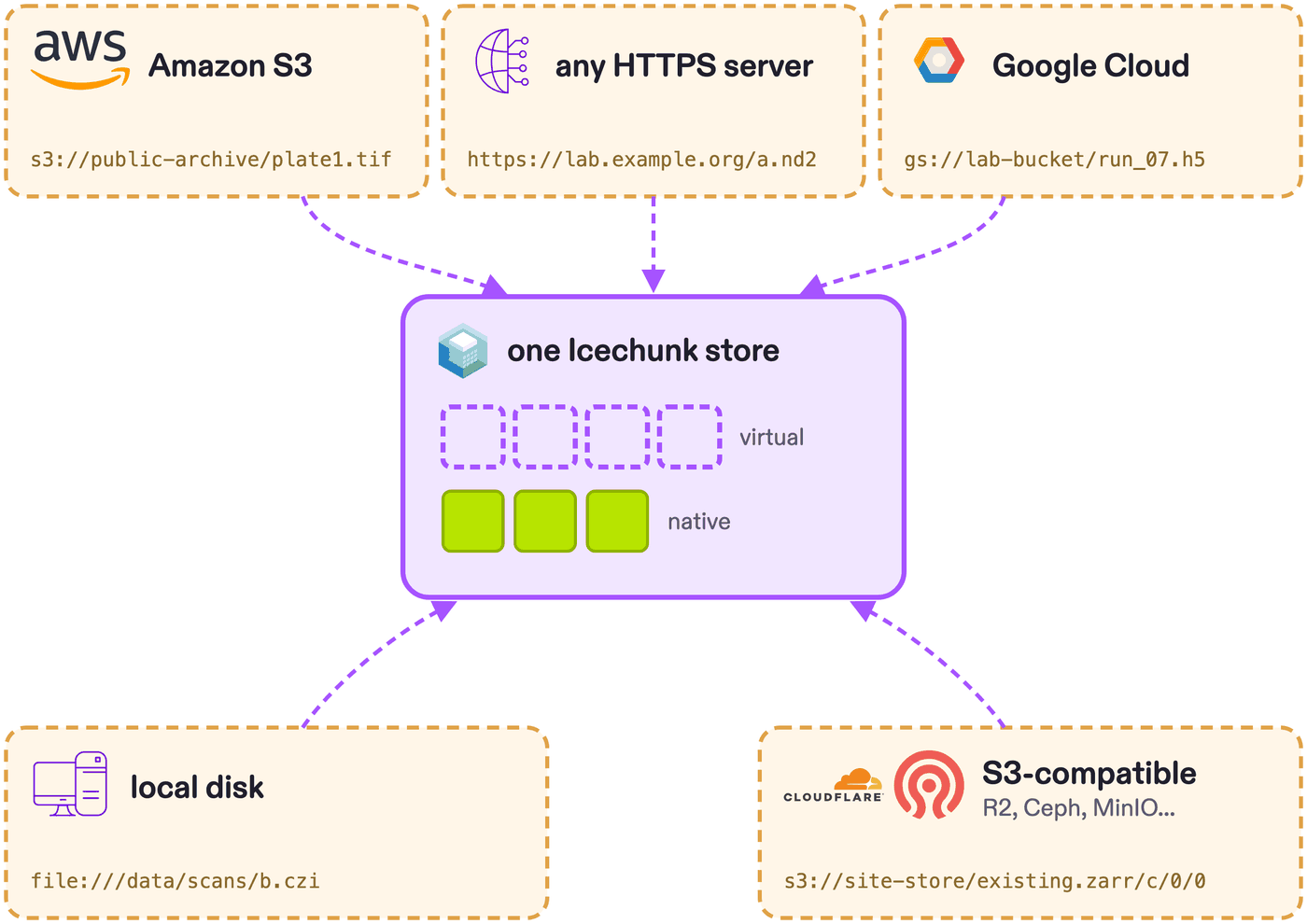
Those files can live locally, or even somewhere else, as long as Icechunk knows how to access them it will work. You can also mix virtual chunks from many different files, or even file types, and combine them with native chunks.
A virtual chunk is only a file path, an offset and a length, so the references are tiny next to the data they point to. dynamical.org’s HRRR forecast store points into NOAA’s 14 PB archive of GRIB files with 924 million virtual chunks, and all of its references take up about 15 GB, roughly a millionth of the data.
Zero-copy ingest gives several advantages:
One interface over many formats
A single dataset is often spread across many files, and often many formats, sometimes including existing Zarr stores. Ingested this way, it all opens as one Zarr store, so the work of handling each format happens once at write time, not in every reader.
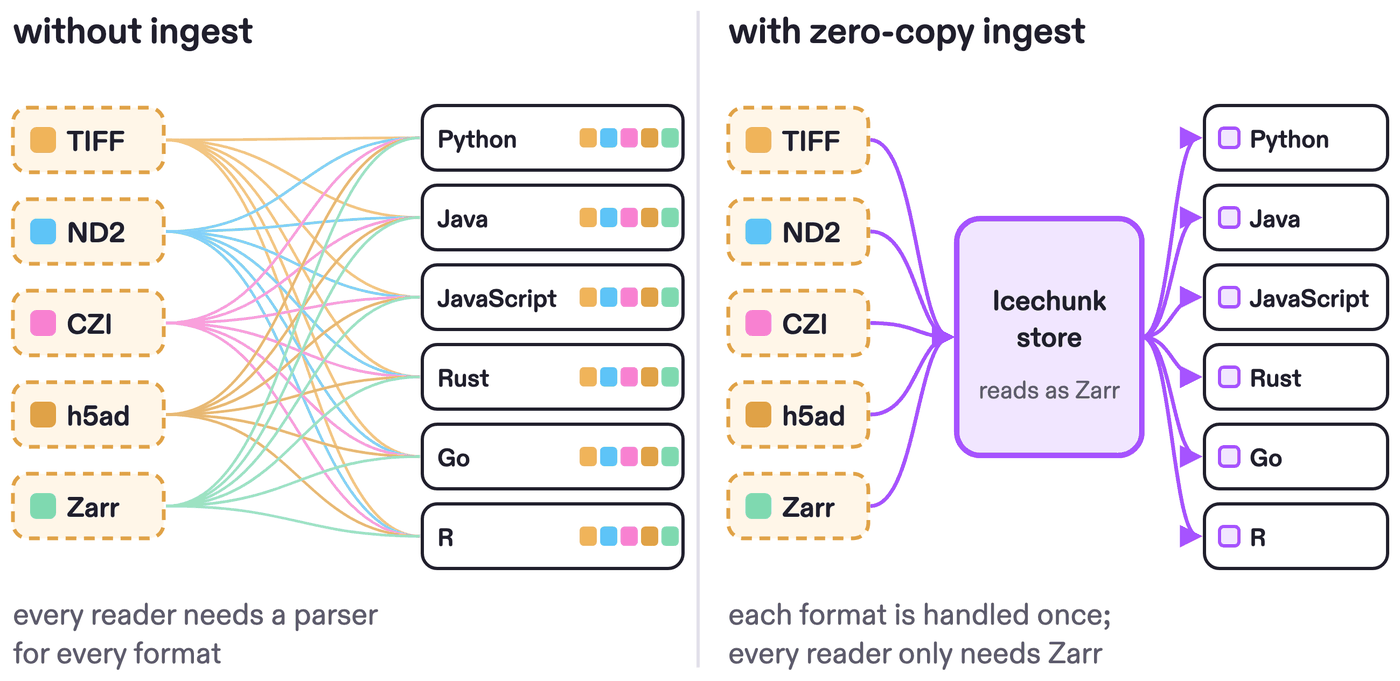
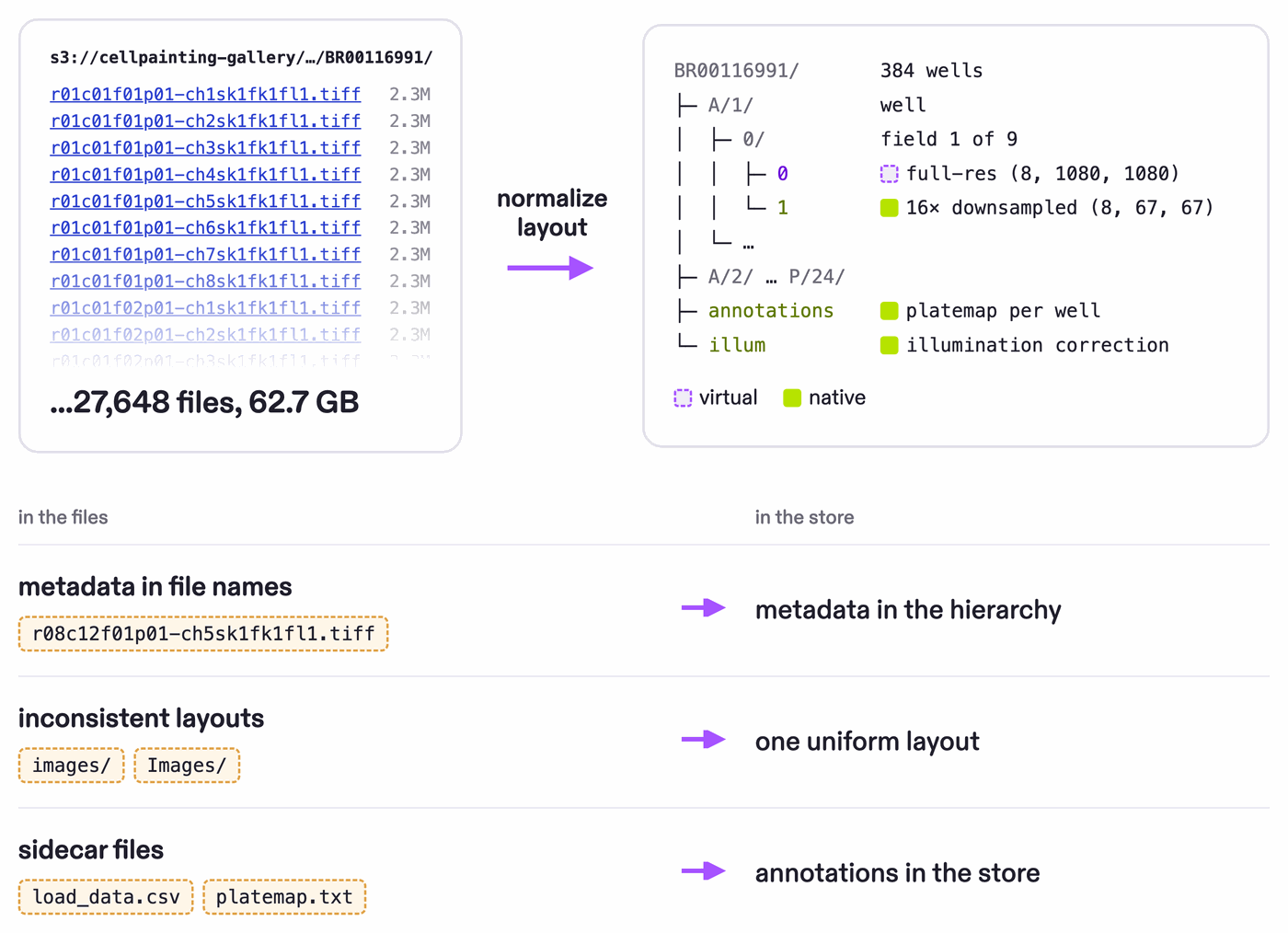
The Cell Painting Gallery, for instance, is part TIFF, part slightly-different TIFF, part ND2, with illumination corrections as npy: many formats to handle.
Cloud-optimized access
Many common scientific formats predate cloud storage, so to read even a small part of a file you may have to download the whole thing. As datasets grow and move to the cloud, that gets expensive fast. (For background, read what cloud-optimized scientific data is.)
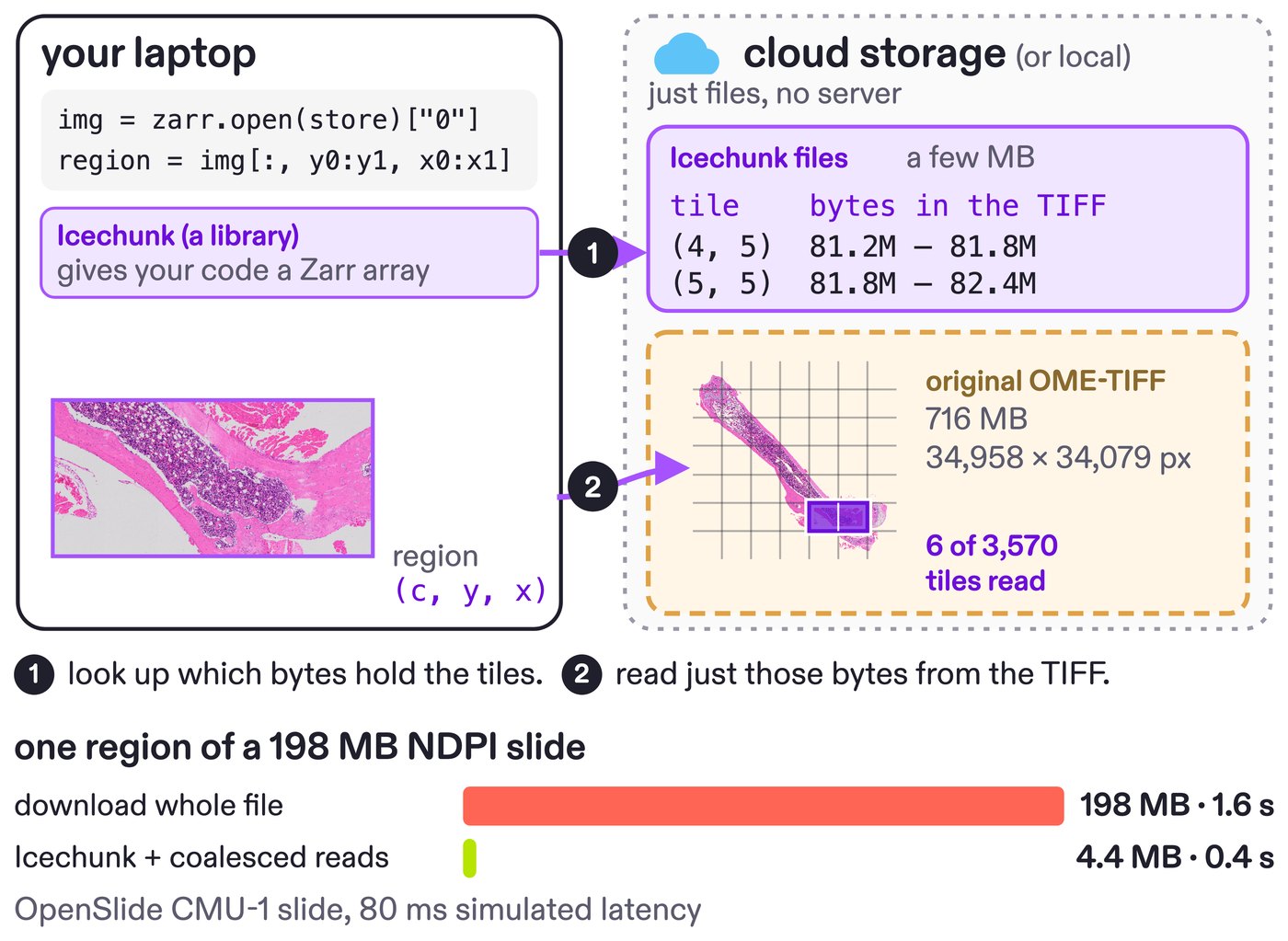
Zero-copy ingest makes those older files cloud-native: a query fetches only the chunks it needs, straight from the originals, turning a multi-gigabyte download into a few megabytes. The gains are largest in two cases.
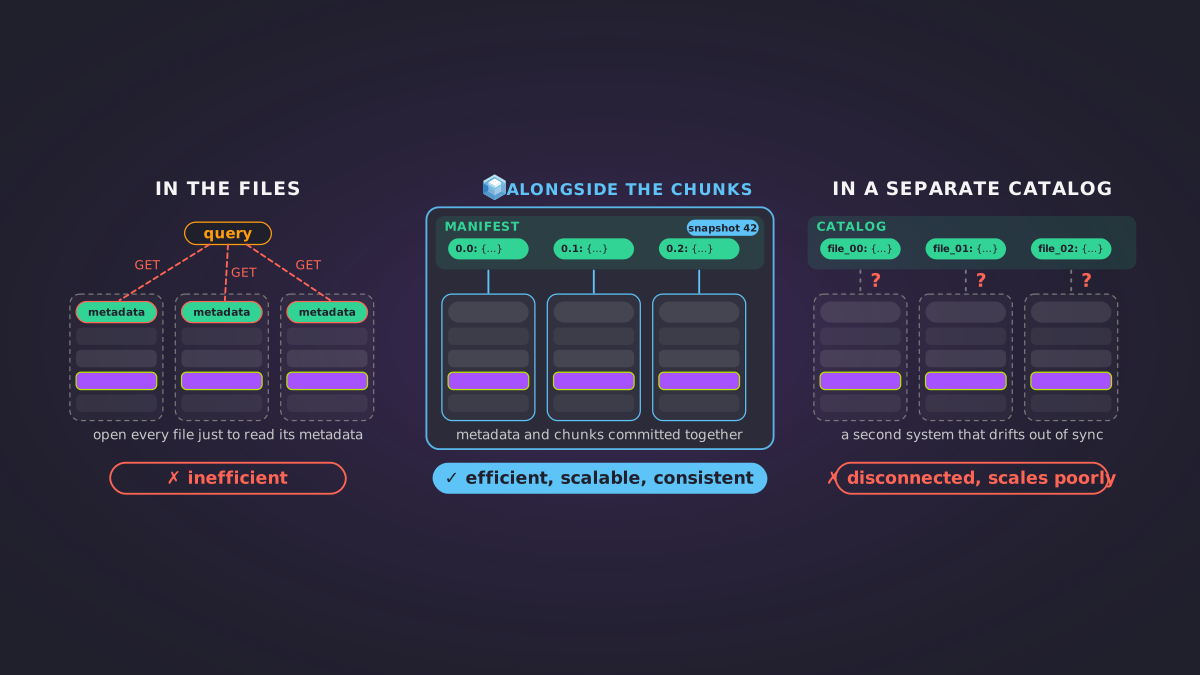
The first is when a file’s metadata has to be walked with a chain of serial requests before you can find the data, as in TIFF and HDF5. Each step costs a round trip to object storage. Icechunk records where every chunk lives at ingest, so a reader finds any chunk in a fixed number of requests:
The second is when you need only a subset of a big file, which is common in many fields:
- Omics: a few genes from an H5AD file holding millions of cells.
- Whole-slide imaging: one region of a gigapixel slide (see this visualization).
- Geospatial: the time series at one location from a global archive of NetCDF or GRIB files.
You are still subject to the limitations of hardware and physics for download speed, but Icechunk works to get you as close to them as possible.
Original and derived data together
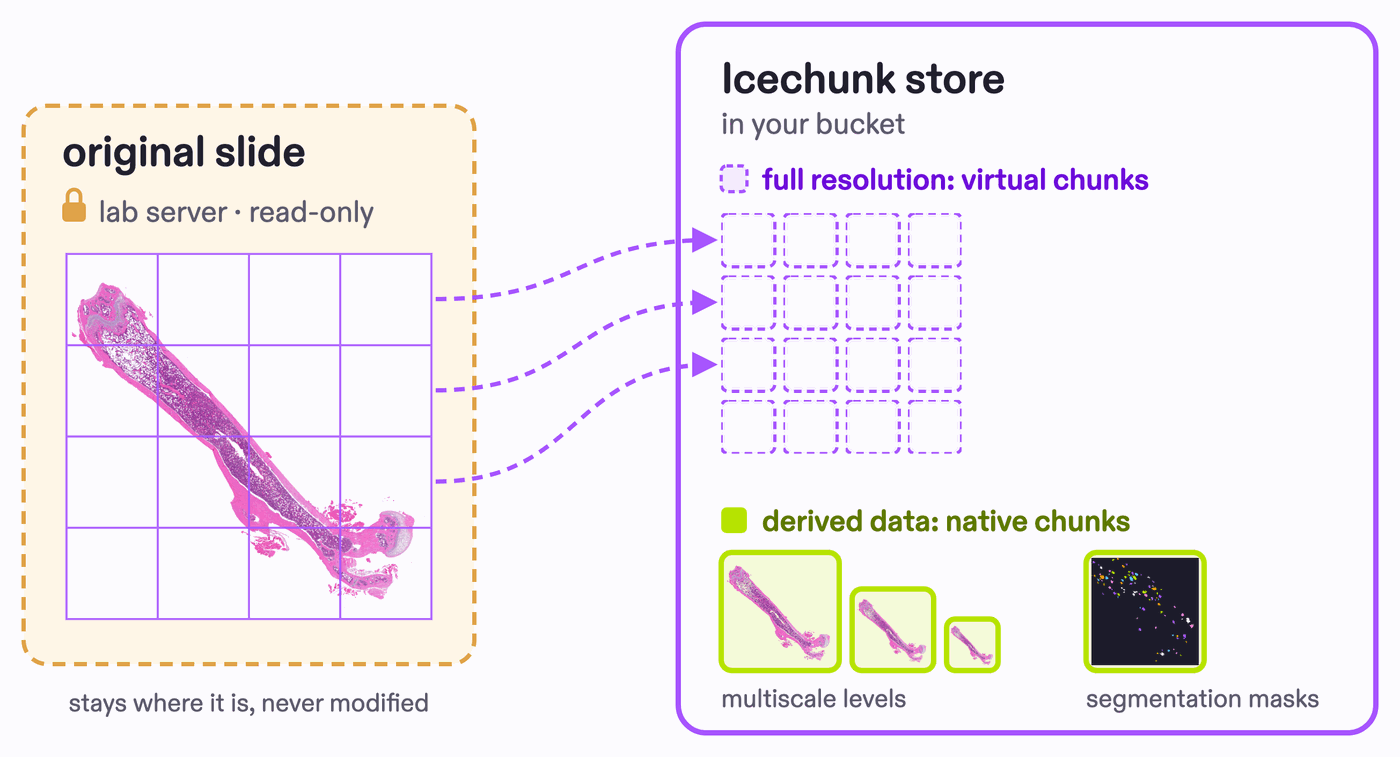
Analysis products such as segmentation masks or derived values usually live apart from the raw data, in a separate folder you have to keep in sync. Zero-copy ingest keeps them together: the raw images and their segmentation masks live in one Zarr store as separate groups or arrays.
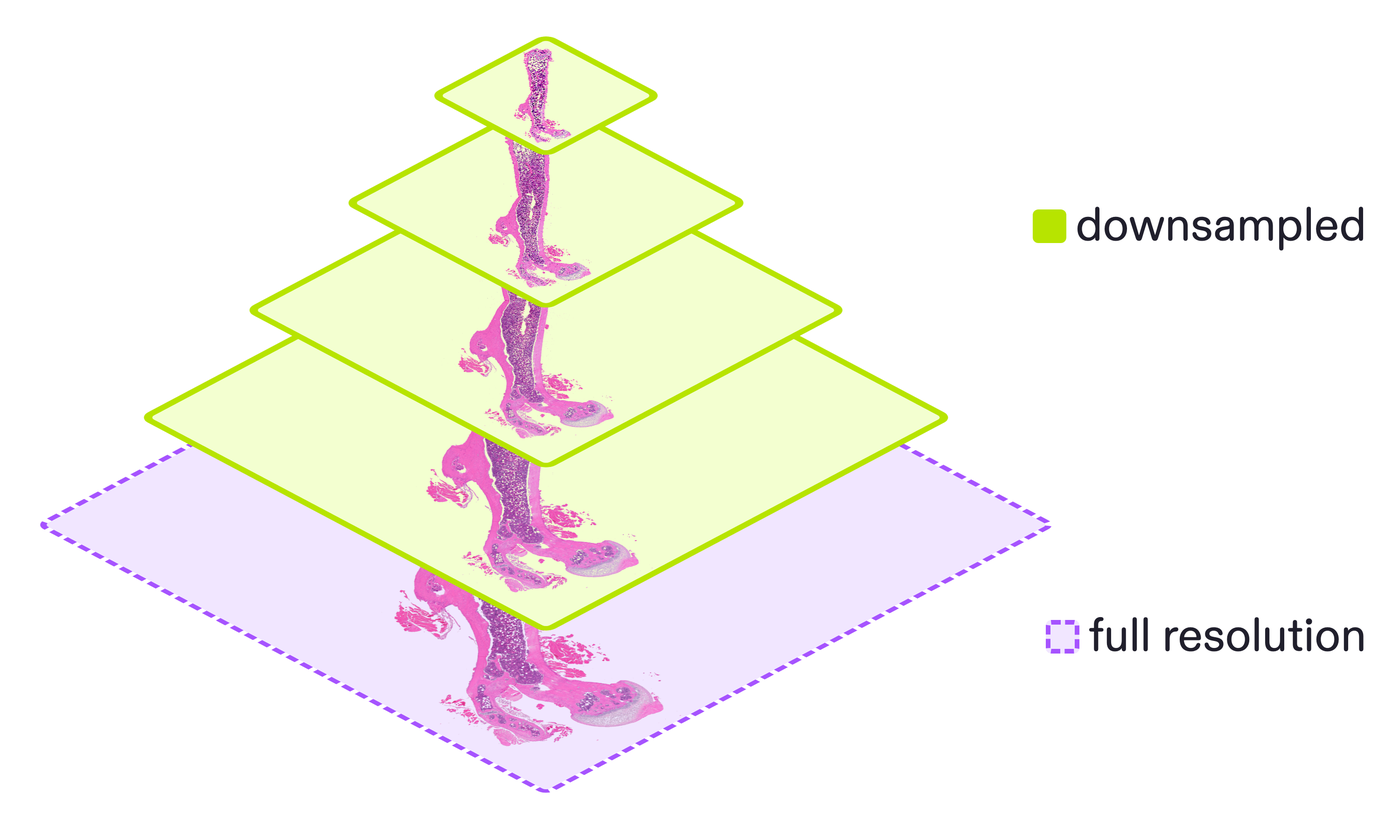
You can also generate downscaled multiscale previews at ingest for faster visualization. Under the hood this mixes virtual chunks (the raw pixels, referenced in place) with native chunks (the derived arrays, stored directly), so you get that responsiveness without duplicating the originals into Zarr. Tools like ngff-zarr build the multiscales.
Versioning and integrity
Collaborative science needs versioned data. Analyses have to reproduce months later, public datasets get new versions, and colleagues need to build on each other’s work without overwriting it.
Icechunk versions your data like git: commits, rollback, and a guarantee that readers always see a consistent view, safe from race conditions. This lets you track changes over time, and keeps derived data reproducible.
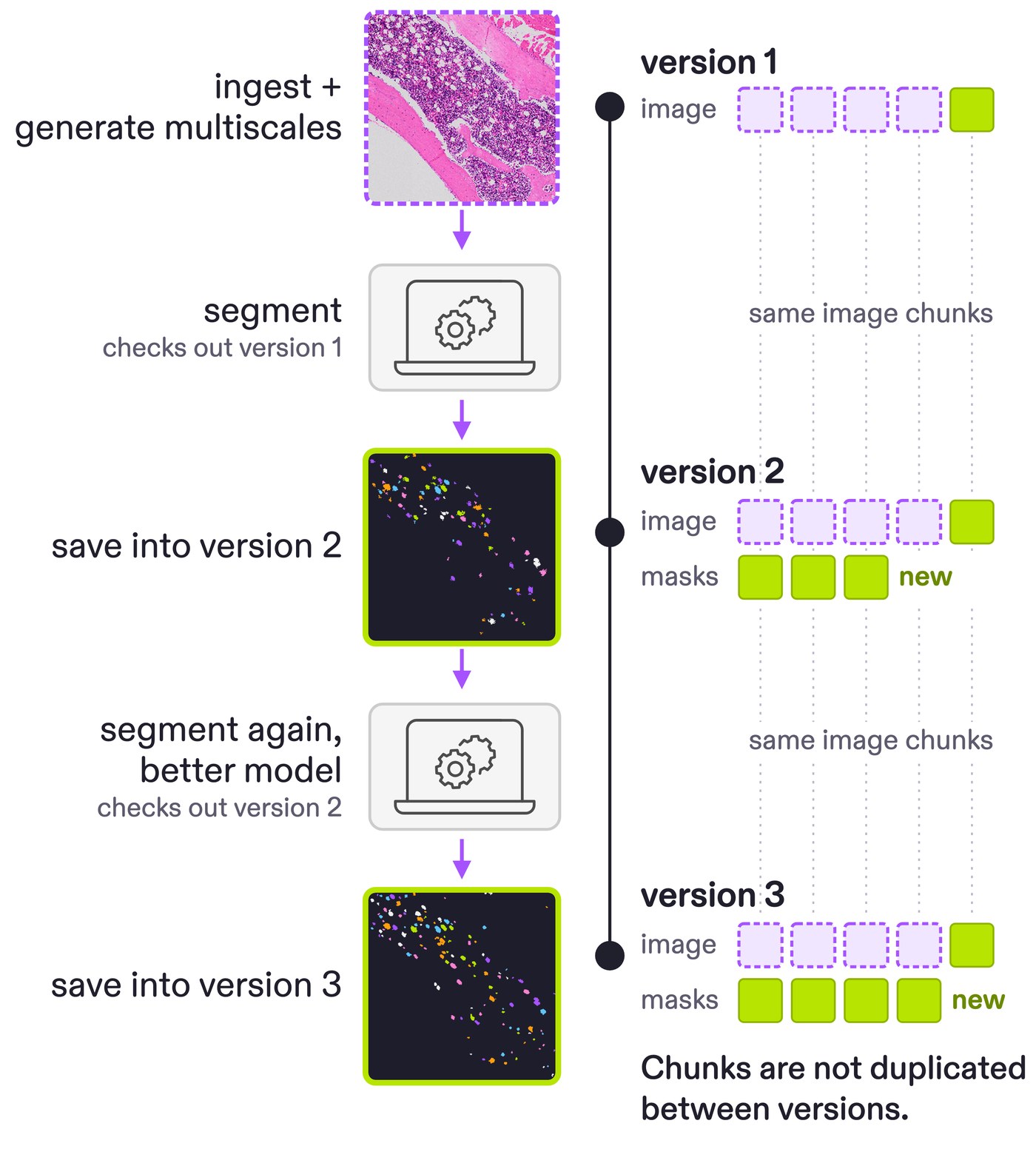
For virtual chunks, Icechunk will warn you if a source file has changed since it was ingested. So you will always be protected from someone changing the data out from under you, in a way you never would be if you just directly opened the raw file.
Standardized layout
Real collections are laid out inconsistently, with per-dataset idiosyncrasies. If you are the only one managing your data then you can rearrange the file structure. But you cannot do that for a public atlas, and you might break some of your analysis code when doing so. Zero-copy ingest presents the data as Zarr, and allows you to create a tidy, uniform layout no matter how the raw files are named and arranged.
Additionally, sometimes different layouts may be better for different applications. Since virtual stores are very small you can cheaply make virtual stores of the same raw data with different layouts that better align to different tasks.
In the Cell Painting Gallery, for instance, some datasets keep their images under images/ and others under images/Images/, and some datasets store metadata as parquet while others use many csv.gz files. Zero-copy ingest rewrites the apparent layout to hide that variation, and can even combine or rewrite metadata into one consistent scheme across datasets.
Arbitrary combinations from any source
The data for one analysis is often split across places: several experiments you ran yourself, or pieces sitting in archives you don’t own. You just want it together in one Zarr store to work with. It works on any dataset you can access, not just data you control.
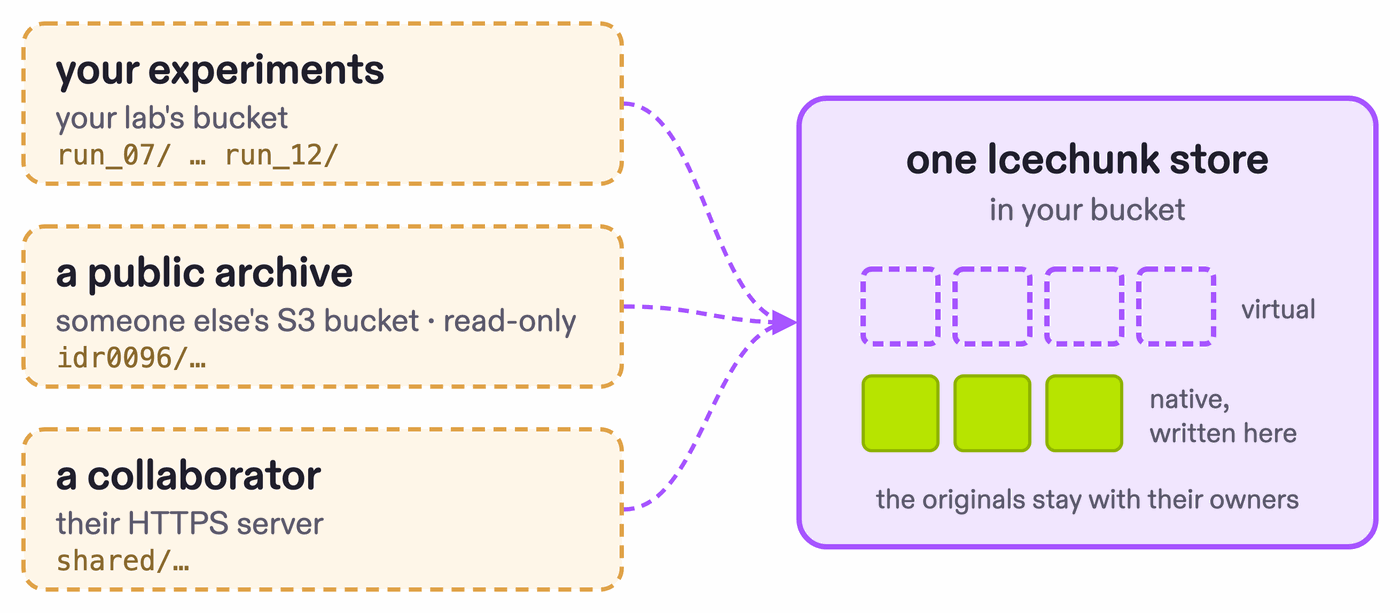
Because a virtual chunk is just a reference, the source files can live anywhere Icechunk can reach, including an S3 bucket hosted by someone else. One store can mix native chunks with virtual chunks pointing at TIFFs, HDF5s, and ND2s from different sources, and still present the whole thing as a single Zarr store.
How zero-copy ingest works
The work of zero-copy ingest has four parts.
1. Finding the byte ranges.
This is quite simple for some formats, but not always: TIFF and HDF5 have to have their metadata walked first, as shown in Cloud-optimized access.
2. Arranging them into a hypercube.
Next is deciding how the byte ranges should stack together into a data hypercube. For a single OME-TIFF z-stack this is pretty clear, because its chunks already form a (z, y, x) cube. But for other datasets it often requires some thought: “how does this virtual chunk relate in array space to this other chunk?”
3. Arranging the hierarchy.
Next is choosing how to arrange the arrays and groups in the Zarr hierarchy, so later readers don’t have to repeat that work.
4. Enriching the metadata.
Last is how you structure, add to, or amend the metadata around the core data. For example, when I ingest microscopy data I always transform it to comply with the OME-Zarr spec, which means it will work out of the box with a whole slew of community tools.
Zero-copy ingest in practice
We have used zero-copy ingest on archives across several fields:
- Microscopy and bioacoustics: OpenCell’s protein images and NOAA’s SanctSound recordings, each turned into a data exploration app (Your data layer matters more than ever).
- Satellite imagery: seven years of GOES-16 imagery, 380,000 NetCDF files, as one Zarr store (Old format, no problem!).
- Weather forecasts: GRIB archives such as NOAA’s National Blend of Models (Virtually Gribberish), and dynamical.org’s HRRR, which pairs a virtual store with a materialized one (Having it all).
- NASA Earth science data: the GPM IMERG precipitation archive, in a pilot with Development Seed (Solving NASA’s cloud data dilemma).
- And many more on the Earthmover Marketplace.
The code we use for this is open source:
- VirtualiZarr creates virtual references from many file formats and writes them to Icechunk.
- minus-80 is our framework for ingesting biology data into Icechunk, built on VirtualiZarr.
To see how Icechunk controls access to the original files, read Virtual chunks that just work, but securely. For a deeper dive into virtual chunks, watch Tom Nicholas’s talk on virtual stores from ESIP 2026 (slides).
Xarray Community Developer